Focus Points for Lightroom Classic
Current stable release: V3.4.5 updated October 30, 2026 • Preview: V4 PRE 4 (“The Next Level”)
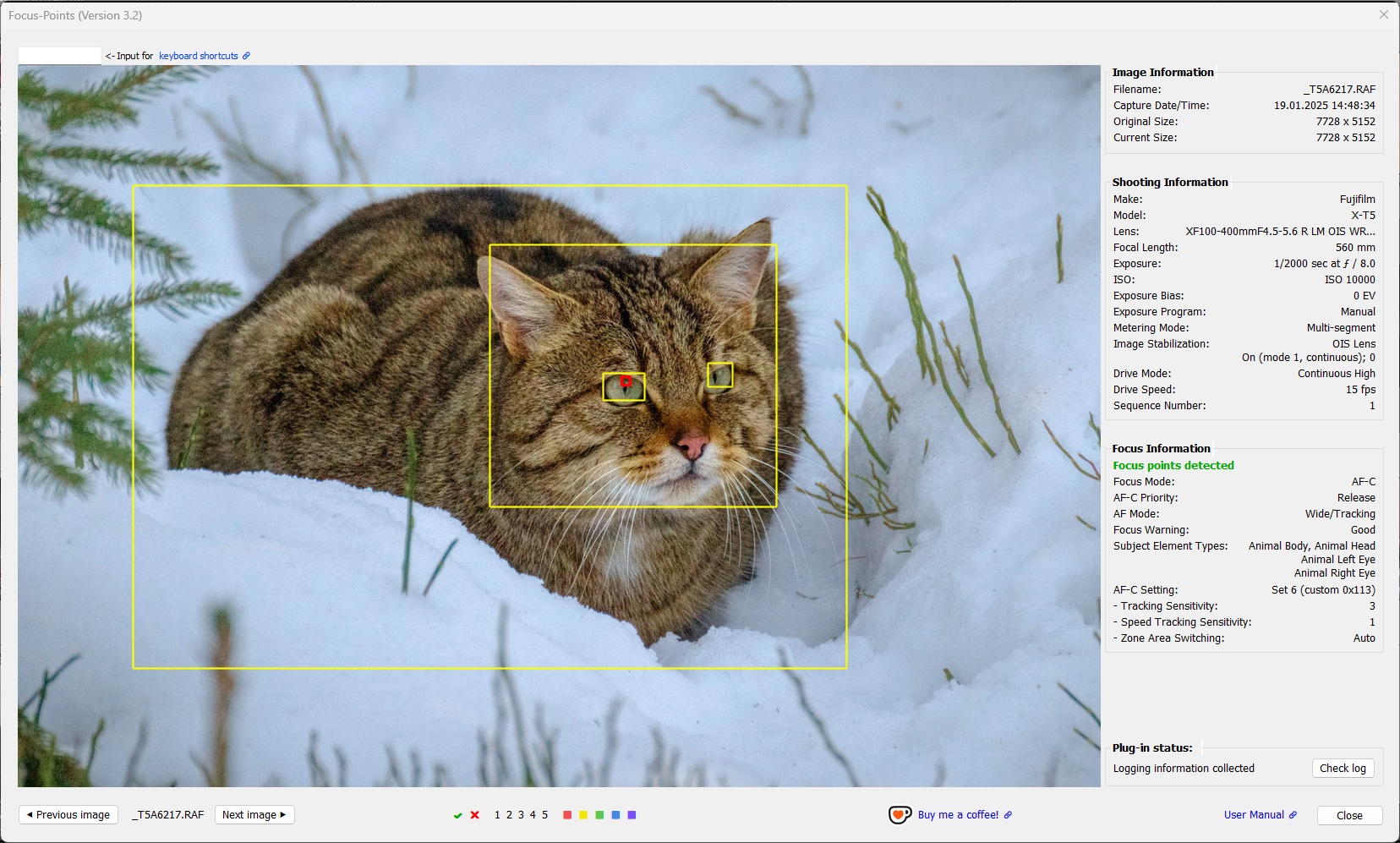
Why Focus Points?
Every photograph tells two stories.
The first is the image itself.
The second is the information your camera recorded while capturing it.
Modern cameras record far more than the final photograph. Along with the image they record autofocus information, subject detection, focus distance, lens settings, camera orientation and many other details that help explain how the photograph was captured.
Lightroom Classic imports only part of this information and displays even less.
Focus Points brings this information together in a single view, allowing you to review each photograph with the information your camera actually recorded.
Whether you’re trying to understand why a photograph is perfectly sharp, why it isn’t, or simply how your camera behaved in a particular situation, Focus Points helps you see what the camera saw when you pressed the shutter.
Use Focus Points to…
- See where your camera focused.
- Review autofocus areas, detected faces and subjects.
- Inspect the information recorded by your camera.
- Search image metadata.
- Straighten images using recorded roll-angle information.
- Rate, flag and label photographs while reviewing them.
Lightroom Versions
Focus Points is compatible with Lightroom Classic, LR5.71 and LR6 perpetual licenses and LrC subscriptions.
Focus Points is not compatible with Lightroom Desktop or Camera RAW. It is based on the Lightroom SDK, which is only available in Lightroom Classic.
1 LR5.7 does not support tagging photos within the plugin UI or straightening images by applying compensation for camera roll angle, since the required functionality is not supported by Lightroom SDK 5.x.
Supported Cameras
Focus Points supports cameras from
Canon • Nikon • Sony • Fuji • Olympus / OM System • Panasonic • Pentax • Ricoh • Apple
The level of support depends on the information recorded by each camera model. Please refer to the compatibility list to check if your camera is supported.
Documentation
The documentation is organized by purpose.
| Document | Purpose |
|---|---|
| 📘 User Manual | Complete feature documentation and camera-specific information. Learn how Focus Points works, how to interpret the information displayed by the plugin and how to get the best results with your camera. If you are new to Focus Points, it is recommended that you read chapters 1, 2 and the part of chapter 3 that applies to your camera. |
| 🚀 Quick Setup Guide | Get started in minutes. Recommended settings, display modes, and the fastest way to configure Focus Points for your workflow. |
| ▶️ Video Tutorial | Watch Olivier Rocq’s complete walkthrough of Focus Points, covering installation, configuration, and everyday use. Original video in French. Choose your language in Youtube video settings, audio track. |
| ❓ FAQ | Answers to common questions about installation, supported cameras, performance, and everyday usage. |
| ⚠️ Messages and Warnings | Understand autofocus analysis results, status messages, and warnings. |
| 📝 Release Notes | Latest versions with new features, bug fixes and compatibility changes |
| 💬 Discussions | Questions, ideas and feedback from the community. |
Features
Focus Point Viewer
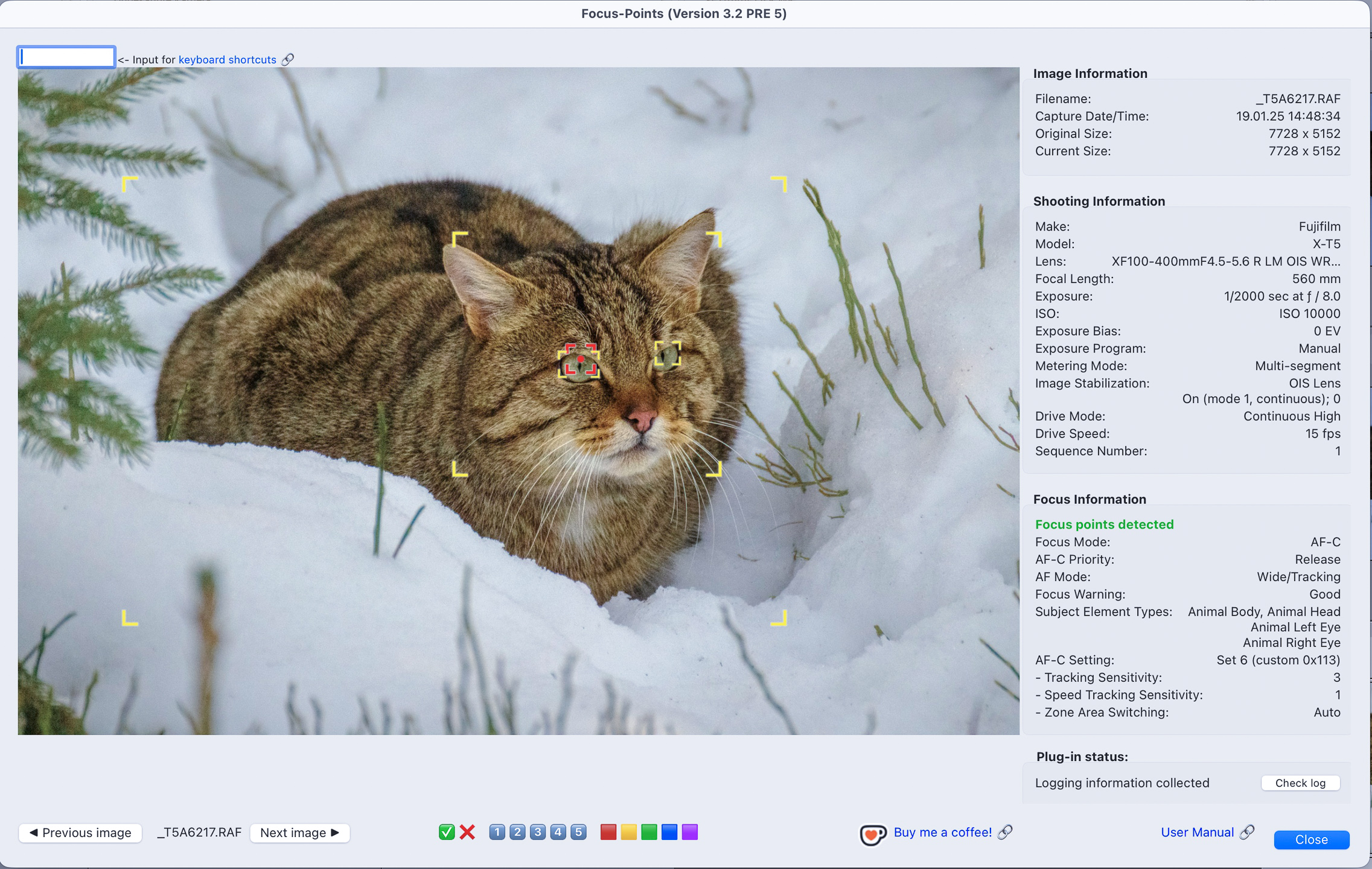
The Focus Point Viewer displays the selected photograph together with autofocus information recorded by the camera.
Depending on camera support, the viewer can display
- active autofocus point
- user-selected autofocus point or autofocus area
- inactive autofocus points
- detected faces
- detected subjects
- crop mode
The exact information available depends on the camera model and the metadata recorded for the image.
For a complete explanation of the different markers and their meaning, see the User Manual.
Metadata Viewer
The integrated Metadata Viewer displays camera metadata that is not normally available in Lightroom Classic.
Unlike Lightroom’s Metadata panel, the Metadata Viewer reads the information directly from the original image file and provides access to camera-specific metadata, including manufacturer-specific information where available.
Features include
- live search
- filtering by tag name or value
- metadata group display
- direct access to EXIF, XMP and camera-specific metadata
The Metadata Viewer is particularly useful when analysing camera behavior, comparing photographs or exploring newly supported camera models.
Straighten Images
Many modern cameras record the camera’s roll angle when a photograph is taken.
Focus Points can use this information to automatically straighten one or more selected photographs by applying the corresponding crop angle in Lightroom Classic.
This is particularly useful when reviewing action, wildlife or sports photography where manually straightening a large number of images would be time-consuming.
Version 3.4 also introduces interactive straightening directly from the Focus Point Viewer, allowing you to preview the result immediately and undo the adjustment if required.
Availability depends on camera support for roll-angle metadata. See the compatibility section for supported camera models.
Contributing and Support
Bug reports and feature requests are always welcome. If you discover a camera that is not yet supported or notice incorrect autofocus information, please open a GitHub Issue or start a GitHub Discussion.
Camera support has grown over many years thanks to photographs and metadata provided by users around the world.
Every contribution helps improve support for future releases.
If you don’t have a GitHub account and don’t want to create one, you can email me at focuspoints.plugin@gmail.com.
Enjoying Focus Points?
If Focus Points has become a useful part of your Lightroom workflow and you’d like to support its continued development, bug fixes, and future improvements, you can buy me a coffee on  Ko-fi. Your support is always appreciated, but never expected.
Acknowledgements
Focus Points began as the open-source project created by Whizzbang Inc.
Since then it has evolved through contributions from many members of the Lightroom community.
Special thanks go to Phil Harvey, creator of ExifTool. Without ExifTool, much of the camera-specific metadata displayed by Focus Points would not be accessible.
Special thanks also go to John R. Ellis for providing the algorithm used to preserve aspect ratio while rotating photographs—functionality available in Lightroom itself but not exposed through the Lightroom SDK. John is a renowned SDK expert and the creator of numerous amazing Lightroom plugins, including the Debugging Toolkit, without which this plugin wouldn’t exist.
A full list of contributors to this project can be found on the project’s GitHub Contributors page.
License
Original work © Whizzbang Inc
Ongoing maintenance and modifications © 2026 Karsten Gieselmann
Licensed under the Apache License, Version 2.0 (the “License”);
This plugin contains code from AutoHotkey (GPLv2).
See the accompanying LICENSE files for details